Classic controller to USB programming
What is this page for?
This short page shows how to program or reprogram an adapter
that does not contain a firmware at the moment. Such adapters
will show as an Atmega32U2 device.
Programming
Prerequisites
When installing the raphnet adapter manager, you must allow the
"Atmel" driver to install, otherwise programming your adapter will be
impossible. Once installed correctly, the adapter should be visible in
the Windows Device Manager under the "Atmel USB Devices" section:

Before continuing, make sure the adapter is the only raphnet product connected
to the PC, then start the raphnet-tech adapter manager.
Step 1
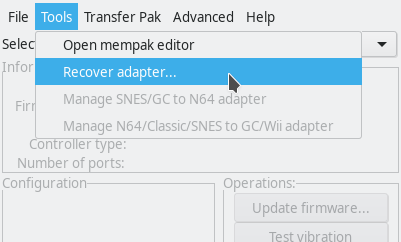
Select Recover adapter... from the Tools menu.
Step 2
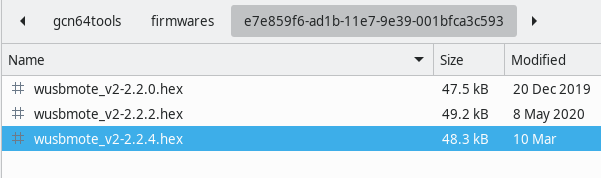
Navigate to the directory where the adapter
manager is installed (Typically under Program Files) and enter
the firmware / e7e859f6...c593 directory. Select the latest version
unless you were told otherwise by raphnet technical support.
Step 3
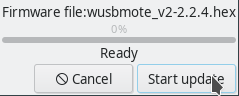
Click Start update to program the adapter.
Once the operation finishes, quit the adapter manager. Disconnect and reconnect the adapter. Let Windows "install" the new device if necessary, then start the adapter manager to confirm your adapter is now detected.
If the above fails...
Please contact raphnet support. Do not try anything else, and do not try installing
other firmwares as this could permanently brick the adapter.